
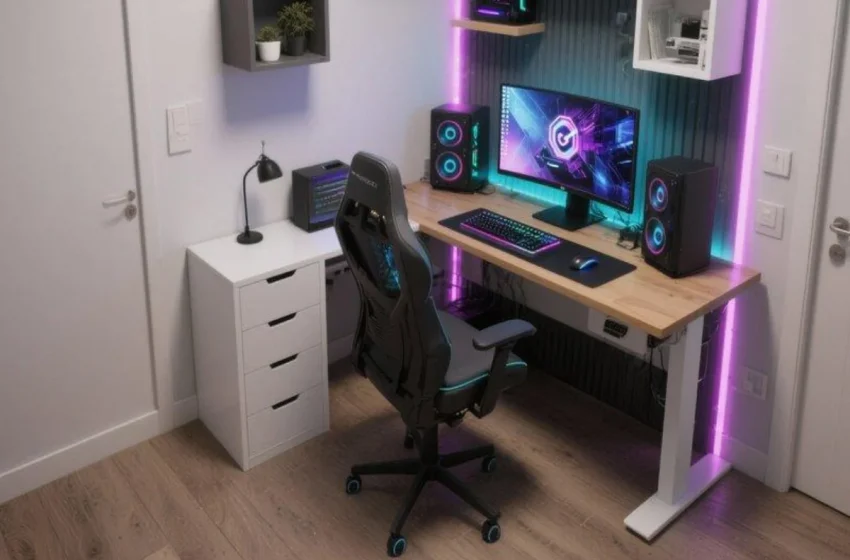
Small Gaming Room Ideas That Make Every Inch Count
A small room doesn’t mean you have to settle for a basic gaming setup. With the right layout, compact furniture, smart storage, and carefully planned lighting, even a tiny bedroom corner can become a comfortable and impressive gaming space.
The key is to design around the space you actually have instead of trying to copy a large gaming room. Measure the usable wall, account for the door and furniture, and make sure there is enough room for your chair to move before adding decorative elements. Current small-room setup guidance also emphasizes planning the desk, chair movement, screen position, storage, and cable routing before buying accessories.
The good news is that many of the best space-saving solutions are simple: floating desks, monitor arms, vertical shelving, wall-mounted accessories, under-desk storage, and controlled lighting can dramatically improve a compact setup.
Here are 10 small gaming room ideas that can help you make practically every inch count.
1. Build a Compact Corner Gaming Setup
One of the easiest ways to maximize a small room is to use an unused corner.
Instead of placing a traditional rectangular desk in the middle of a wall, position a compact corner desk so that two walls become part of your gaming zone.
Step-by-Step
Step 1: Measure both walls of the corner.
Step 2: Choose a desk that doesn’t block the door, window, wardrobe, or walking path.
Step 3: Mount your monitor on an adjustable arm if possible.
Step 4: Place the PC tower underneath or beside the desk.
Step 5: Add a small shelf above the setup for headphones, controllers, or collectibles.
Step 6: Finish with subtle LED lighting behind the monitor.
This approach creates a dedicated gaming zone without requiring an entire room.
2. Use a Floating Desk to Free the Floor
A floating desk is one of the smartest solutions for a very small gaming room.
Because the desk is attached to the wall, the floor underneath remains visually open. This can make the room feel less crowded while also creating additional space for storage.
Floating desks are especially useful when you need the same room to function as a bedroom, study area, and gaming space.
Step-by-Step
Step 1: Choose a sturdy wall that can support the desk.
Step 2: Install the desk at a comfortable seated height.
Step 3: Mount the monitor instead of using a large monitor stand.
Step 4: Add a slim cable tray underneath.
Step 5: Keep the floor underneath completely clear.
Step 6: Add LED lighting beneath the desktop for a floating effect.
3. Go Vertical With Gaming Storage
When floor space is limited, your walls become valuable storage.
Instead of adding another cabinet or large bookshelf, move controllers, headphones, games, collectibles, and small accessories upward.
Floating shelves, pegboards, controller hooks, and wall-mounted organizers are particularly useful in compact gaming spaces.
Step-by-Step
Step 1: Identify everything currently taking up desk space.
Step 2: Separate items into frequently used and rarely used categories.
Step 3: Install hooks for headphones and controllers.
Step 4: Add one or two floating shelves for decorative items.
Step 5: Use a pegboard for smaller accessories.
Step 6: Leave some wall space empty so the room doesn’t feel overloaded.
4. Replace a Large Monitor Stand With a Monitor Arm
A large monitor stand can consume surprisingly valuable desk space.
A monitor arm moves the screen off the desk and gives you additional room for your keyboard, mouse, speakers, notebook, or controller.
Monitor arms are frequently recommended as a high-impact upgrade for compact setups because they reclaim the footprint of the monitor stand.
Step-by-Step
Step 1: Choose a monitor arm compatible with your display.
Step 2: Secure it properly to the desk.
Step 3: Position the screen directly in front of your seating position.
Step 4: Adjust the height and viewing angle.
Step 5: Route the monitor cable along the arm.
Step 6: Use the newly available desk space for your keyboard and mouse.
5. Turn a Closet or Nook Into a Gaming Station
Have an unused closet, alcove, or awkward little niche?
Instead of treating it as wasted space, turn it into a dedicated gaming station.
A compact gaming nook can hold a desk, monitor, lighting, headphones, and even vertical storage without taking over the rest of the room. Closet-style gaming stations are a popular example of using otherwise overlooked space.
Step-by-Step
Step 1: Empty the available nook.
Step 2: Measure its width and depth.
Step 3: Install a compact desk or floating desktop.
Step 4: Mount the monitor directly against the wall.
Step 5: Add lighting behind the screen.
Step 6: Install shelves on the side walls.
Step 7: Keep the chair compact enough to move easily.
6. Choose a One-Wall Gaming Layout
If your room is extremely small, simplify everything by keeping the gaming setup against one wall.
This creates a clean visual zone while preserving the rest of the room for your bed, wardrobe, or other furniture.
Step-by-Step
Step 1: Select the longest usable wall.
Step 2: Place the desk against it.
Step 3: Keep the monitor centered.
Step 4: Put the PC underneath or at one side.
Step 5: Add vertical storage above the desk.
Step 6: Keep the surrounding floor area open.
A one-wall arrangement is particularly useful in bedrooms where the gaming setup must coexist with a bed.
7. Use Under-Desk Storage Instead of a Large Cabinet
Floor-standing storage can quickly make a small room feel cramped.
Instead, use the area underneath your desk intelligently.
You can store controllers, cables, games, headphones, chargers, and other accessories in compact drawers or rolling storage.
Step-by-Step
Step 1: Keep your most frequently used items within arm’s reach.
Step 2: Install a small under-desk drawer.
Step 3: Add a cable-management tray underneath.
Step 4: Use small boxes for spare cables.
Step 5: Keep the PC elevated rather than blocking your leg space.
Step 6: Avoid filling every inch underneath the desk.
The goal is storage without making the chair area uncomfortable.
8. Create a Cozy Gaming Bedroom
A gaming setup doesn’t have to look like a futuristic RGB showroom.
For a bedroom, a cozy aesthetic can make the space feel more relaxing.
Use warm lighting, soft textiles, wood furniture, plants, and restrained gaming decor.
Step-by-Step
Step 1: Start with neutral wall colors.
Step 2: Use a compact wooden desk.
Step 3: Choose an ergonomic chair that visually fits the bedroom.
Step 4: Add warm bias lighting behind the monitor.
Step 5: Use a small rug to soften the space.
Step 6: Add one or two gaming posters rather than covering every wall.
Layered lighting can help a small room feel more intentional than relying on one harsh ceiling light.
9. Make Lighting Work for the Room
Lighting can transform a small gaming space, but more RGB isn’t always better.
Instead of covering every wall with bright LEDs, use a few carefully positioned light sources.
Step-by-Step
Step 1: Add bias lighting behind the monitor.
Step 2: Use a desk lamp for practical lighting.
Step 3: Add one low-level ambient light in the room.
Step 4: Choose one main RGB color instead of several competing colors.
Step 5: Keep lighting away from the direct screen reflection.
Step 6: Adjust brightness according to the time of day.
A compact room often benefits from layered lighting rather than a single intense source.
10. Keep the Setup Minimal
Sometimes the best small gaming room idea is simply to remove unnecessary things.
A compact setup can look much larger when the desktop isn’t covered with speakers, collectibles, cables, chargers, boxes, and accessories.
Step-by-Step
Step 1: Remove anything you don’t use regularly.
Step 2: Keep only essential peripherals on the desk.
Step 3: Mount the monitor.
Step 4: Use wireless peripherals where practical.
Step 5: Hide cables underneath the desk.
Step 6: Choose one decorative focal point.
Step 7: Leave some empty wall and floor space.
The result is a gaming room that feels intentional rather than crowded.
How to Make a Small Gaming Room Feel Bigger
After choosing your layout, use these simple visual tricks:
Use Light Colors
White, cream, light gray, beige, and soft wood tones can make the room feel more open.
Keep the Floor Visible
Avoid unnecessary cabinets and bulky furniture.
Use Wall-Mounted Equipment
Move monitors, headphones, controllers, shelves, and accessories upward whenever practical.
Limit Your Color Palette
Choose two or three main colors rather than using every RGB color simultaneously.
Hide Cable Clutter
Cable management has a surprisingly large impact in a small room because everything is more visible.
Leave Negative Space
Not every wall needs a poster, shelf, light panel, or decoration.
Small Gaming Room Layout Mistakes to Avoid
1. Buying the Desk First
Measure the room before purchasing furniture. Desk depth and chair clearance can matter more than the desk’s advertised width.
2. Blocking the Door
Always check the complete door swing and walking route.
3. Ignoring Heat
Gaming PCs can generate significant heat in enclosed rooms, so don’t completely surround the PC with furniture or block its airflow.
4. Using Too Much RGB
Too many colors can make a small room visually chaotic.
5. Filling Every Wall
A small room needs visual breathing space.
6. Forgetting Comfort
A beautiful setup isn’t successful if your chair movement, monitor position, desk height, or legroom are uncomfortable.
Final Thoughts
A small gaming room can be just as impressive as a large one when every element has a purpose.
The best strategy is to plan the footprint first, maximize vertical space second, and decorate last. A compact desk, monitor arm, wall storage, hidden cables, comfortable chair, and thoughtful lighting can completely transform a limited room.
You don’t need dozens of accessories or an enormous desk to create a gaming space you’ll love. Sometimes the smartest setup is the one that uses fewer things—but uses every inch intelligently.
FAQ
What is the best desk for a small gaming room?
A compact straight desk, corner desk, or floating wall-mounted desk can work well. Choose based on the actual room dimensions and required monitor, keyboard, mouse, and PC space rather than choosing a desk simply because it looks good.
How can I fit a gaming setup into a tiny bedroom?
Use one wall or an unused corner. A monitor arm, floating shelves, compact desk, wall-mounted accessories, and under-desk storage can significantly reduce the amount of floor space required.
Should I use a corner desk?
A corner desk can be excellent when the corner is otherwise unused. However, measure its depth carefully because some corner desks have large sections that can actually make a small room feel more crowded.
How do I organize gaming accessories?
Keep frequently used accessories close to the desk. Use wall hooks for headphones and controllers, shelves for collectibles, drawers for cables, and under-desk trays for power and cable management.
How do I make a small gaming room look bigger?
Keep the floor open, use light or neutral colors, reduce visual clutter, use wall-mounted storage, and leave some negative space around the main gaming setup.
Is RGB lighting good for a small gaming room?
Yes, but moderation is important. Bias lighting behind the monitor and a few controlled accent lights can create atmosphere without making the room visually overwhelming.
Can I have a gaming setup in my bedroom?
Absolutely. A one-wall or corner setup can work particularly well because it allows the gaming area to coexist with the bed and other bedroom furniture.
What should I prioritize when designing a small gaming room?
Prioritize comfortable seating, appropriate desk dimensions, monitor placement, clear chair movement, cable management, ventilation, and storage before decorative elements. A practical foundation will make the room more enjoyable than simply adding more RGB or accessories.